An Internet of things

Musings on iOS and PHP development, IoT and other bits and pieces

Realestate.com.au iPad app goes live

It’s been a number of months and some incredibly late nights in the making but the new realestate.com.a iPad App finally went live in the App Store last Friday, August 12. I was lucky enough to be able to give a demo of the app the night before release at the August Melbourne Cocoaheads meeting to one of the largest crowds to date!

I joined the REA Group mobile team back in March 2011 to help with the continuing development of their iPhone app, and after a UI uplift release for the iPhone we started working on a universal iPad app. After some hiccups along the way, we managed to deliver a brilliant looking, stable app that I’m really proud to have worked on. I’d say it’s reset the bar for iOS property apps and is streets above the competition.

The REA Mobile team is lead by Kevin O’Neill (@kevinoneill), second chaired by Luke Cunningham (@icaruswings) and backed up by Steve Hollaway, Ben Thomas, Mike Rowe, Myles Abbot, Mujtaba Hussain and myself.

Some awesome technical bits / features of the app include:

  • Custom forms (IBAForms) for advanced property searches.
  • A gorgeous custom UI including the little bits that are really hard to customise.
  • Custom map callouts are really hard to customise.
  • It’s a true universal app it has a shared underlying code base and consistent behaviour, look and feel.
  • It rotates, and it rotates like a boss. Rotate it, and see it resize itself without any of that crappy UI flickering you see elsewhere.
  • Swishy tap, pan and swipe gesture recognisers all over the place make interactions really fluid.
  • It’s damn fast with it’s own purpose built back end.
  • It’s stable. We tested the crap out of this app!
  • It caches images and searches and other things;  it also behaves nicely when errors occur.
  • It’s using the latest iOS 4+ technology and minimal amounts of old legacy code.
  • It leverages/wrangles a handful of awesome open source frameworks.
  • It sets the bar for it’s category in mobile property apps.

The realestate.com.au iPad app "Money Shot" as we call it.

Custom callouts are one of the hard things to customise

So yeah ! If you haven’t already - check it out on iTunes -> Realestate.com.au in iTunes

'Epic refactorings' - Melbourne Cocoaheads June 2011

Luke Cunningham (@icaruswings) and I presented a talk at the June 2011 Cocoaheads meet up titled “Epic refactorings and patterns to make your code awesome!”.

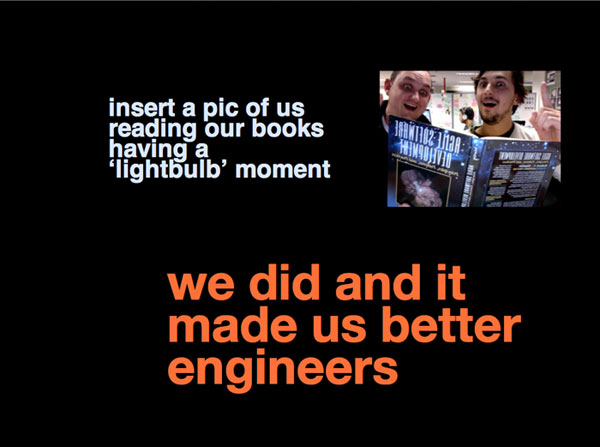
Luke and Jesse's lightbulb moment

The topic was inspired by a number of design patterns we employed while developing the new realestate.com.au iPad application. We highlighted some of shortcomings we found with UIViewController and demonstrated our end result - ViewCoordinator

The book highlighted in the presentation is Agile Software Development. Principles, Patterns, and Practices by Bob Martin. The two design patterns we highlight form the book were single responsibility and Interface segregation.

Melbourne Cocoaheads 06/2011 - Talk 2 - Luke Cunningham & Jesse Collis from Oliver Jones on Vimeo.

The slides are available on Slide Share.

Note: the video’s audio is quite average.

Attending: WWDC 2011 and Swipe Conference

Just a quick post to highlight some upcoming events I’m getting excited about.

If you’re reading this and attending WWDC or Swipe Conference then hit me up on Twitter and we’ll coordinate beers.

WWDC 2011 June 6-10 2011

First up is WWDC 2011 in San Francisco. - I didn’t go last year and this year I’m flying up along side a handful of Melbourne iOS developers from the Melbourne Cocoaheads group and the Itty Bitty Apps guys, Sean Woodhouse and Oliver Jones. There’s a Pre-WWDC catch up in Richmond/Cremorne in Melbourne on 1/6/11 being organised by Intunity and I will be attending that too.

Swipe Conference 2011

Later in the year is Swipe Conference (swipeconference.com.au@swipeconf), September 5 - 7 in Melbourne is the next big thing for iOS Developers and looking at the line up it’s going to be a great three days. I’m hoping it brings in the iOS developers from near and far that have yet to turn up at a Cocoaheads meet - there’s a lot of developers out there.

I’m also attending TEDxSydney on the 28th of May, but since I missed out on a proper ticket I’ll be hanging out out the front all day like I did last year.

Xcode 4 Shortcuts - Melbourne Cocoaheads April 2011

Stewart Gleadow (@StewGleadow) and I did a quick presentation at Cocoaheads this month highlighting some of our favourite (or more obscure) Xcode 4 shortcuts.

The Control, Option, Shift and Command symbols

The main take away of the whole exercise for me was finally memorising the shortcut symbols. This has vastly improved my ability to remember new shortcuts. I suggest you do the same!

Stew has posted answers to some of the questions over on his blog.

Cocoaheads 04/2011 - Talk 2 - Xcode 4 Keyboad Shortcuts from Oliver Jones on Vimeo.

Is it worth supporting iOS 3 in 2011?

Now that we’re well into 2011 the question has to be asked: Is it still worth supporting iOS 3 users? There are a lot of cool new APIs and language features you can take advantage of in iOS 4 (blocks being one of them), most new work I’m involved with is targeted at iOS 4 and soon we’ll have iOS 5.

So, are you cutting off paying customers or future paying customers by requiring iOS 4.0 and above?

The tldr;

No, not really. iOS 3 numbers are in steady decline and I don’t think new or existing apps will be alienating too many active customers by requiring iOS 4+.

Since July 2010 I’ve been collecting a basic set of anonymous data from users. I collect iOS version, app version and the device type. I have recorded just over 109,000 pieces of data to date.

Quick stats

  • Only 11% of active users are running less than iOS 4.0.
  • Only 6% of active users of my main paid app Seoul City Metro are running less than iOS 4.0.

The data

Comparison of iOS versions over time

This graph includes all the data I have collected so far summed up by month and major iOS version. The decline of iOS 3 is clear here with iOS 4 accounting for 89% of all active users by March 2011.

Combined Apps iOS versions (one week)

A sample of the last week’s data split by iOS version.

iOS4 Distribution

This graph splits up the 89% pie piece from the second graph and shows the uptake of each distinct iOS 4 version. I found the iOS 4.3 update really interesting, since it was released on March 11 (only 9 days ago) and already accounts for 30% of users. (FYI: the first occurrence of iOS 4.3 was 15-01-2011) The previous version (iOS 4.2.1) is the second highest total at 55%. This means 75% of iOS4 users are quite up to date.

The same split for the iOS 3 distribution shows the latest version of non iPad iOS 3, 3.1.3 accounts for 81% of users and the version prior to that (3.1.2) accounts for 17.6%.

Paid vs. Free iOS Distribution

Here’s the difference between paying customers and non-paying customers. The results are interesting but as I expected; paying customers are more up to date than non paying customers. There are half the number of iOS 3.x users (by percentage) of my $1.99 app as there are using my free app. It makes sense that people who pay for apps keep things up to date more than your user with a phone full of free apps.

Automatically create your iOS Icon.png files with a simple bash script

I was recently made aware of the very handy sips(1) command line tool. Sips is short for Scriptable Image Processing System; it is more or less a command line front end to some of Apple’s processing abilities.

My problem that day was How can I automatically resize my Icon.png artwork and all of a sudden with the knowledge of sips’ existence it was easy to write a small bash script to rename and resize my large 512x512 pixel artwork down to the various names and sizes required by iOS. (Thanks Mark!)

The script is simple. Give it an input PNG image at least 1024x1024 pixels and it will create your Icon.png and derivatives nicely. The sizes required at any one time are all outlined in the Application Icons section of the iOS Application Programming Guide.

This script should save you at least a dollar on the similar GUI apps on the app store that do the same thing..

Checkout the gist

Update 2013 updated with new image sizes.

Integrating Apple iAds - Melbourne CocoaHeads November 2010

I’m presenting a talk tonight at Melbourne CocoaHeads on implementing Apple’s iAd framework. I’ll be going over how to add the iAd framework to your project, a handful of things to remember about using iAds and an overview my first hand experiences with Seoul City Metro as an iAd supported app.

I will be showing some code I have recently sourced a named JCAdSupportedNavController that provides a good way to implement iAds in a UINavigationController. You can check it out on github.

The sides for the presentation are up on slideshare

Attending: TEDxCanberra 2010

Just a heads up that I will be attending TEDx Canberra this weekend! After forgetting to signup properly to TEDx Sydney I’m looking forward to a great day!

A photo of me yawning in the background

Recent iOS version statistics from Delhi City Metro

Not long after iOS 4.0 was released I pushed a small update to Delhi City Metro to keep track of some basic (anonymous) user statistics. I’m keen to gauge the audience of any specific iOS 4 features I might consider adding and now that I’ve been able to visualise these, I thought I’d share them here.

To add a geographic angle to the iOS usage statistics you can see in the second graph that the majority of Delhi City Metro users are from India.

iOS 4 take up rate

Several weeks after the launch of iOS4 the split between iOS 4 and iOS 3 is 4.x 64% and 3.1.x 31% with iOS 3.2 at 4%. (statistics from 13-26/8/2010)

Geographic sales for Delhi City Metro

Adding a 'pull to refresh' control to a UITableView

Today I was tooling around with some interface concepts and playing with apps like foursquare and Twitter (previously Tweetie) and I wondered if I could implement something similar to the now famous ‘pull down to refresh’ method of initialising a refresh of the content within a UITableView.

As it turns out it wasn’t as difficult as I thought; There were already a couple of elegant solutions out and about. The first example I found was by Oliver Dropnik, which talked about altering an existing solution posted on git hub by user devindoty called EGOTablePullViewRefresh.

Oliver’s code looked like it was a good addition to devindoty’s because he had decided to subclass UITableViewController which leads to a much more complete solution that’s easier to move between projects. My only issue with Oliver’s code was that it refactored a lot of the underlying implementation, where I didn’t see too much wrong with it.

I decided to come up with a half way measure. I moved the majority of the grunt work into a subclass of UITableViewController, cleaned up the Xcode demo project included with the source code and pushed it all back up to github. If you’re at at all interested in this, I’d suggest checking out my fork of the EGOTablePullViewRefresh project.

pull-to-refresh effect like Tweetie 2 and foursuare

Update 23/2/2013: Apple has implemented this functionality in iOS 6 with UIRefreshControl, I would use that instead.